
Where are the Facebook Guides in the App?Updated 8 months ago
When starting the Challenge, we want to make sure you have access to all of the resources you need! To achieve this, we put together Guides that will walk you through how to get started and how to use all of the tools available to you within the Lifestyle!
You may be having trouble finding the Guides tab while using the Facebook or Livingood Approved App. Most commonly, this is due to a Facebook app update. Follow the steps below to access the Guides, and make the most out of your time in the Crew!
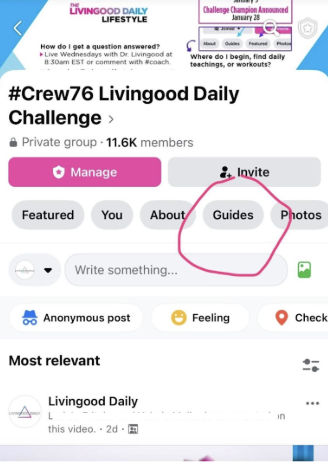
The Guides should appear above your ability to post in the Crew, and below the number of members. If you do not see the grey “Guides” double as an option, be sure you are on the main discussion board of the current or next Crew. Then, scroll to the right until you have that in view.
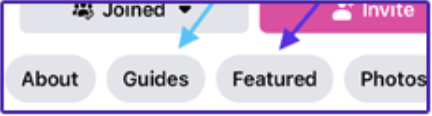
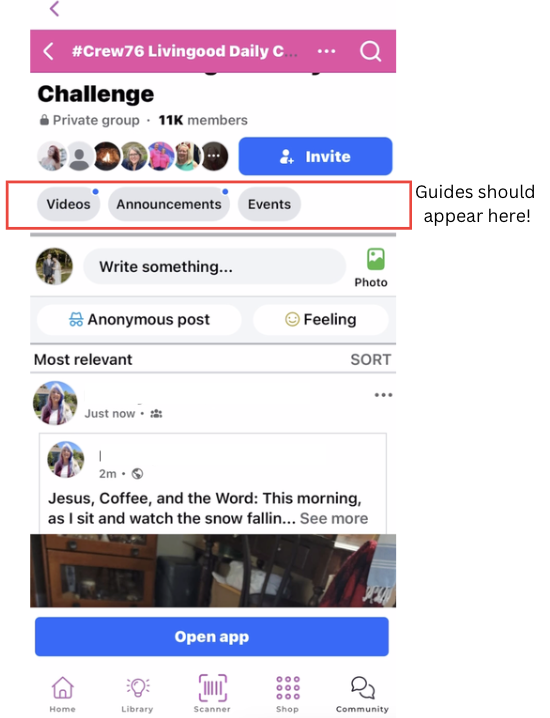
- If you don't see the Guides, click Open App at the bottom of your screen to leave the Livingood Daily App and enter the Facebook App.
- Locate the Guide Tab in App.
- If you don't see it in the App, we recommend using Facebook on a desktop, and ensuring your Facebook app is as up to date as possible!
You are always welcome to ask additional questions on the Crew page!